Django admin: better export to XLS
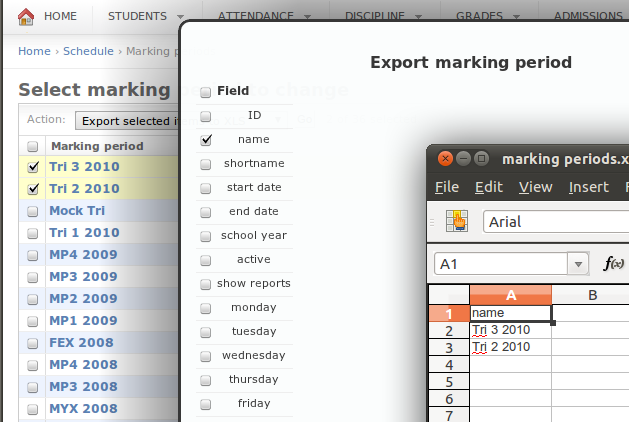 The goal here is to make a slick gui for selecting exactly what the user wants to export from Django’s Change List view. It will be an global action, so lets start there.
[python]
def export_simple_selected_objects(modeladmin, request, queryset):
selected_int = queryset.values_list(‘id’, flat=True)
selected = []
for s in selected_int:
selected.append(str(s))
ct = ContentType.objects.get_for_model(queryset.model)
return HttpResponseRedirect(“/export_to_xls/?ct=%s&ids=%s” % (ct.pk, “,”.join(selected)))
export_simple_selected_objects.short_description = “Export selected items to XLS”
admin.site.add_action(export_simple_selected_objects)
[/python]
This adds a global action called Export selected items to XLS. I went with xls instead of ods because xlwt is very mature and LibreOffice can open xls just fine. It’s limited by the max length of get variables because it just lists each id. See this bug report. Next is the view.
[python]
import xlwt
def admin_export_xls(request):
model_class = ContentType.objects.get(id=request.GET[‘ct’]).model_class()
queryset = model_class.objects.filter(pk__in=request.GET[‘ids’].split(‘,’))
model_fields = model_class._meta.fields
if ‘xls’ in request.POST:
workbook = xlwt.Workbook()
worksheet = workbook.add_sheet(unicode(model_class._meta.verbose_name_plural))
fields = []
The goal here is to make a slick gui for selecting exactly what the user wants to export from Django’s Change List view. It will be an global action, so lets start there.
[python]
def export_simple_selected_objects(modeladmin, request, queryset):
selected_int = queryset.values_list(‘id’, flat=True)
selected = []
for s in selected_int:
selected.append(str(s))
ct = ContentType.objects.get_for_model(queryset.model)
return HttpResponseRedirect(“/export_to_xls/?ct=%s&ids=%s” % (ct.pk, “,”.join(selected)))
export_simple_selected_objects.short_description = “Export selected items to XLS”
admin.site.add_action(export_simple_selected_objects)
[/python]
This adds a global action called Export selected items to XLS. I went with xls instead of ods because xlwt is very mature and LibreOffice can open xls just fine. It’s limited by the max length of get variables because it just lists each id. See this bug report. Next is the view.
[python]
import xlwt
def admin_export_xls(request):
model_class = ContentType.objects.get(id=request.GET[‘ct’]).model_class()
queryset = model_class.objects.filter(pk__in=request.GET[‘ids’].split(‘,’))
model_fields = model_class._meta.fields
if ‘xls’ in request.POST:
workbook = xlwt.Workbook()
worksheet = workbook.add_sheet(unicode(model_class._meta.verbose_name_plural))
fields = []
Get selected fields from POST data
for field in model_fields: if ‘field__’ + field.name in request.POST: fields.append(field)
Title
for i, field in enumerate(fields): worksheet.write(0,i, field.verbose_name) for ri, row in enumerate(queryset): # For Row iterable, data row in the queryset for ci, field in enumerate(fields): # For Cell iterable, field, fields worksheet.write(ri+1, ci, unicode(getattr(row, field.name)))
Boring file handeling crap
fd, fn = tempfile.mkstemp() os.close(fd) workbook.save(fn) fh = open(fn, ‘rb’) resp = fh.read() fh.close() response = HttpResponse(resp, mimetype=’application/ms-excel’) response[‘Content-Disposition’] = ‘attachment; filename=%s.xls’ % (unicode(model_class._meta.verbose_name_plural),) return response return render_to_response(‘export_to_xls.html’, { ‘model_name’: model_class._meta.verbose_name, ‘fields’: model_fields, }, RequestContext(request, {}),) [/python] Remember to set up your URLs. Next is the HTML. Maybe something like this [html] $(document).ready(function() { $(“#check_all”).click(function() { var checked_status = this.checked; $(“.check_field”).each(function() { this.checked = checked_status; }); }); });
Export {{ model\_name }}
[/html] The javascript just makes the check all box work. Note I use jquery, if you don’t you will need to rewrite it. Very simple but it works. Now users won’t have to delete unwanted columns from xls reports. Notice how the user is left on the export screen and not happily back to the edit list. Some ajax can solve this. I’m overriding the global change_list.html which actually isn’t ideal if you use any plugins that also override it. Here’s what I added. [html] $(document).ready(function() { $(“.button”).click(function() { if ( $(“option[value=export_simple_selected_objects]:selected”).length && $(“input:checked”).length ) { $.post( “”, $(“#changelist-form”).serialize(), function(data){ $(“#export_xls_form”).html(data); } ); $(“#export_xls_form”).overlay({ top: 60 }); $(“#export_xls_form”).overlay().load(); return false; } }); });
Close
[/html] I use jquery tools overlay to make a nice overlay screen while keeping the user on the change list page. Basically I want a div to appear and then load some stuff from ajax. What’s cool is that I just post the data to “” so the regular Django admin functions work without editing them for AJAX. Well I did add to the submit button onclick=’$(“#export_xls_form”).overlay().close();’ to close the window when submitting. Ok I’m a complete liar I also added get_variables = request.META[‘QUERY_STRING’] to the view as a cheap way to keep those GET variables. But hey it’s still works as a non ajax admin action and that’s cool. In the screenshot I added a CSS3 shadow and rounded corners to make it look better. What’s next? Well it would be nice if we could access foreign key fields. If this had some type of advanced search and saving mechanism, we’d have a full generic Django query builder. Hmm.